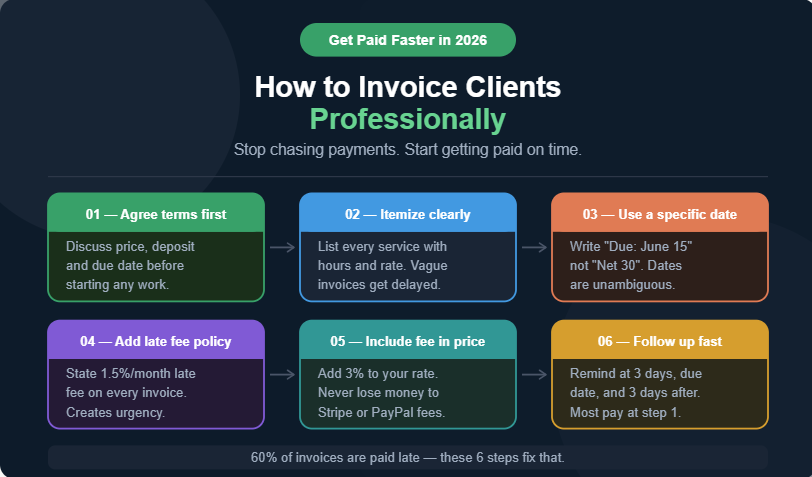
How to Invoice Clients Professionally and Get Paid Faster in 2026
Updated for 2026 | GetCalcWise — Reading time: 9 minutes
Late payments are one of the biggest problems freelancers and small business owners face. Studies show that nearly 60% of invoices are paid late — costing freelancers an average of $6,000 per year in delayed cash flow.
The good news: Most late payments are caused by preventable mistakes in how invoices are written, sent, and followed up on.
This guide shows you exactly how to invoice professionally, get paid faster, and protect yourself legally — including how to account for payment processing fees so you never undercharge again.
Why Most Freelancers Get Paid Late
Before fixing the problem, understand the cause. Late payments usually happen because of one of these reasons:
- The invoice was unclear or confusing
- Payment terms were never discussed upfront
- The invoice was sent too late after the work was completed
- There was no easy payment method included
- No follow-up system was in place
All of these are fixable. Here’s how.
What Every Professional Invoice Must Include
A professional invoice is not just a request for money. It’s a legal document. Make sure every invoice includes:
| Element | Why It Matters |
|---|---|
| Your full name or business name | Legal identification |
| Your email and contact info | Easy communication |
| Client’s full name and address | Correct billing records |
| Invoice number | Tracking and accounting |
| Invoice date | Legal record |
| Due date | Clear payment expectation |
| Itemized list of services | Transparency, prevents disputes |
| Rate and quantity for each item | Clarity |
| Subtotal, taxes, and total | No surprises |
| Payment methods accepted | Makes paying easy |
| Late payment policy | Legal protection |
Missing even one of these can delay payment or create disputes.
Step-by-Step: How to Write a Professional Invoice
Step 1: Set Payment Terms Before You Start Work
Never begin a project without agreeing on payment terms. Discuss and confirm:
- Total project cost or hourly rate
- Payment schedule (upfront deposit, milestone, or on completion)
- Accepted payment methods (Stripe, PayPal, bank transfer)
- Late payment penalty (standard is 1.5-2% per month)
Put this in writing — a simple email confirmation is enough.
Step 2: Use a Consistent Invoice Number System
Invoice numbers help you track payments and look professional. Use a simple system like:
GCW-2026-001
GCW-2026-002
GCW-2026-003
Never reuse invoice numbers. Keep a record of every invoice you send.
Step 3: Itemize Everything Clearly
Vague invoices get questioned and delayed. Be specific:
❌ Bad: “Website work — $1,500”
✅ Good:
- Homepage design (8 hours × $75/hr) — $600
- About page design (4 hours × $75/hr) — $300
- Contact page + form setup (3 hours × $75/hr) — $225
- Logo revisions (5 rounds) — $375
- Total: $1,500
When clients can see exactly what they’re paying for, they approve faster.
Step 4: Always Include the Due Date — Not Just “Net 30”
“Net 30” means payment is due 30 days after the invoice date. But many clients don’t know this — or pretend not to.
Instead of “Net 30,” write:
“Payment due by: June 15, 2026”
Specific dates are impossible to misinterpret.
Step 5: Account for Payment Processing Fees
This is where most freelancers lose money without realizing it.
If you charge $1,000 and the client pays via Stripe, you receive $970.70 — not $1,000. Stripe takes $29.30 in fees.
Two ways to handle this:
Option A — Build fees into your price: If you want $1,000, charge $1,031 to cover Stripe’s 2.9% + $0.30.
Option B — Add a processing fee line item:
- Service total: $1,000
- Payment processing fee (Stripe 2.9% + $0.30): $29.30
- Invoice total: $1,029.30
Note: Some regions restrict passing fees to clients. Check local regulations before using Option B.
👉 Use our Stripe Fee Calculator to calculate exactly what to charge to receive your desired amount.
Step 6: Make Payment Easy
The harder it is to pay, the longer clients wait. Include:
- Direct payment link (Stripe invoice link, PayPal.me link)
- Clear instructions for bank transfer if applicable
- Multiple payment options when possible
Step 7: Send the Invoice Immediately
Send your invoice the same day you complete the work — or on the agreed billing date for ongoing projects. Every day you delay sending is another day added to your payment wait.
How to Get Paid Faster: 7 Proven Strategies
1. Require a Deposit
Ask for 25-50% upfront before starting any project. This:
- Confirms the client is serious
- Covers your costs if the project is cancelled
- Significantly improves cash flow
2. Offer Early Payment Discounts
Add a line to your invoice:
“2% discount if paid within 5 days”
Many clients will take this offer — and you get paid faster while they save money.
3. Set Up Automatic Reminders
Don’t wait until an invoice is 30 days late to follow up. Set reminders at:
- 3 days before due date: “Friendly reminder — invoice due soon”
- Due date: “Invoice due today”
- 3 days after due date: “Invoice overdue — please advise”
- 7 days after due date: “Final notice before late fees apply”
Most late payments get resolved at the first or second reminder.
4. Add a Late Payment Fee
Include this line in every invoice:
“Invoices unpaid after 30 days are subject to a 1.5% monthly late fee.”
This doesn’t mean you always enforce it — but it creates urgency and gives you leverage.
5. Use Professional Invoicing Software
Manual invoices in Word or Excel look unprofessional and are easy to lose. Use dedicated invoicing tools:
- Stripe Invoicing — Free, professional, automatic reminders
- PayPal Invoicing — Free, widely recognized
- Wave — Free accounting + invoicing
- FreshBooks — Paid but powerful for agencies
6. Follow Up by Phone, Not Just Email
For large overdue invoices, a phone call is far more effective than another email. Keep it professional and solution-focused:
“Hi [Name], I’m following up on invoice #GCW-2026-015 for $1,500 due on June 15th. Could you let me know the payment status?”
7. Accept Multiple Payment Methods
Some clients prefer Stripe, others PayPal, some want bank transfer. The more options you offer, the fewer excuses there are for delay.
Invoice Template — Copy and Use
Here’s a complete professional invoice template you can use immediately:
INVOICE

From: [Your Name / Business Name]
Email: [your@email.com]
Website: [yourwebsite.com]

To: [Client Name]
Company: [Client Company]
Email: [client@email.com]

Invoice Number: GCW-2026-001
Invoice Date: May 4, 2026
Due Date: May 18, 2026

─────────────────────────────────────
SERVICES

[Service 1 description]
[Hours] × $[Rate] = $[Amount]

[Service 2 description]
[Hours] × $[Rate] = $[Amount]

─────────────────────────────────────
Subtotal:          $[Amount]
Tax (if applicable): $[Amount]
Total Due:         $[Amount]
─────────────────────────────────────

PAYMENT METHODS
- Stripe: [your payment link]
- PayPal: [your PayPal.me link]
- Bank Transfer: [your bank details]

PAYMENT TERMS
Payment is due by May 18, 2026.
Invoices unpaid after 30 days are
subject to a 1.5% monthly late fee.

Thank you for your business!
Protecting Yourself Legally
For larger projects, consider a simple contract alongside your invoice. A contract should include:
- Scope of work (exactly what is and isn’t included)
- Payment schedule and amounts
- Revision policy (how many rounds are included)
- Kill fee (what happens if the client cancels)
- Intellectual property ownership (who owns the work)
Free contract templates are available at HelloSign, Bonsai, and AND.CO.
Calculate Your Real Earnings After Fees
Before sending any invoice, know exactly what you’ll receive after payment processing fees.
👉 Stripe Fee Calculator — See your exact Stripe earnings
👉 PayPal Fee Calculator — Calculate your real PayPal profit
Frequently Asked Questions
How soon should I send an invoice after completing work? Immediately — the same day if possible. The sooner you send, the sooner the payment clock starts ticking.
What should I do if a client refuses to pay?
Start with a formal written demand. If that fails, consider small claims court for amounts under $10,000. For larger amounts, consult a lawyer. Always have a contract to support your claim.
Can I charge interest on late invoices?
Yes, in most jurisdictions — if you stated the late fee policy on the original invoice. Always include your late payment terms clearly.
Should I use “Net 30” or a specific date?
Always use a specific date. “Net 30” is vague and professional clients may interpret it differently. “Due by June 15, 2026” leaves no room for confusion.
How do I handle clients who always pay late?
Require larger upfront deposits (50-100%) before starting work. If a client consistently pays late, they are not worth working with long-term.
Is it legal to add a credit card processing fee to invoices?
In the US, it depends on your state. In the EU, surcharging is generally prohibited. The safest approach is to build the fee into your price rather than listing it as a separate charge.
What’s the best free invoicing tool for freelancers?
Stripe Invoicing and Wave are both excellent free options. Stripe is better if your clients already have credit cards; Wave is better for bank transfer clients.
Final Thoughts
Professional invoicing is not just about getting paid — it’s about running a real business. Clients respect freelancers who have clear systems, professional documents, and consistent follow-up processes.
Implement these strategies and you’ll spend less time chasing payments and more time doing the work you love.
And before you send your next invoice — always calculate your exact earnings after fees so you never undercharge again.
GetCalcWise — Know your real profit.

Founder of GetCalcWise. I help online sellers,
freelancers, and entrepreneurs understand their
real profit after payment processing fees.
Built this site after losing money to hidden
fees without realizing it.